.png)
Queenslanders were already using consumer AI at work. The problem was they were doing it unsafely, across tools that weren't built for government data.
QChat existed to solve that, but it wasn't working. Poor UX and an outdated UI meant people didn't trust the responses it produced, didn't enjoy using it, and went back to the consumer tools they shouldn't have been using in the first place.
The goal was to redesign it into something people would actually choose.
.png)
The research covered seven distinct personas, from daily AI power users to people encountering the technology for the first time.
Designing for the middle wasn't an option. A finding that only held for half the spectrum wasn't a real finding, and a feature that confused novice users was a genuine security risk. Every decision had to work at both ends simultaneously.
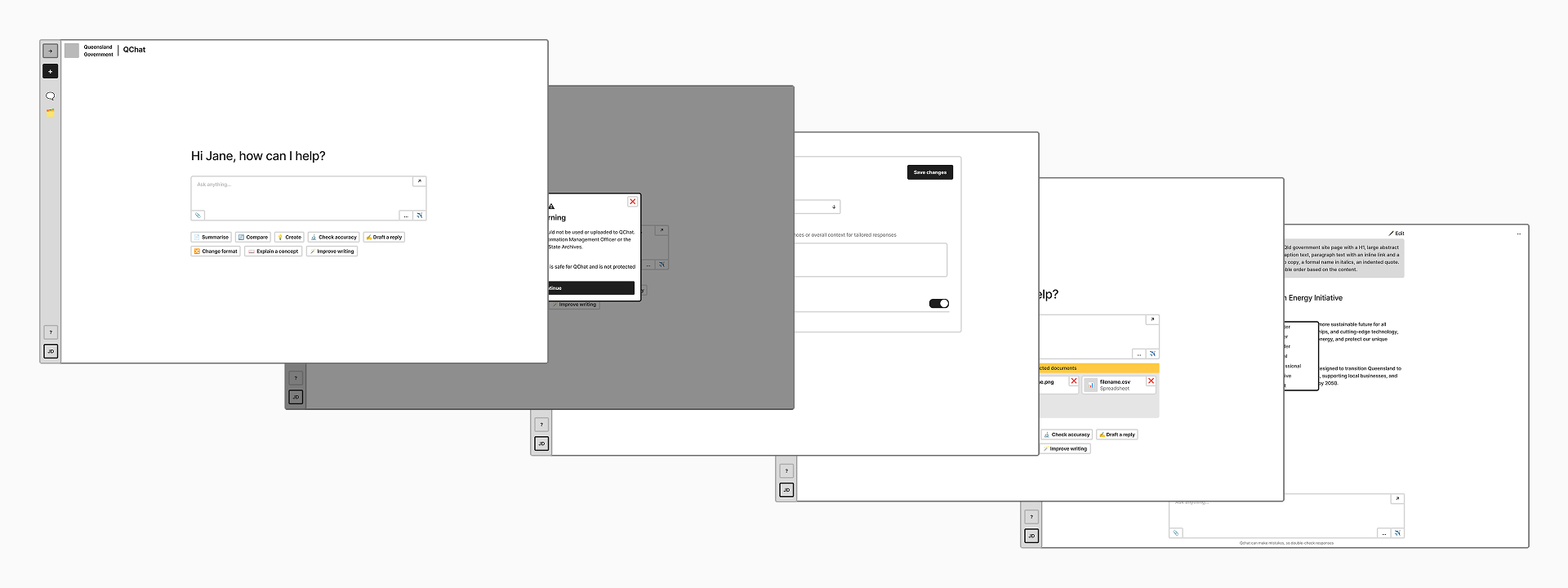
Users already knew how to query... they'd been doing it for years.
The interface didn't need to teach behaviour, it needed to show what was possible.
Prompt suggestions surfaced as invitations rather than tutorials, and progressive actions appeared as conversations deepened, drip-feeding capability without overwhelming new users or boring experienced ones.
The underlying understanding was that explicit onboarding wasn't necessary if the behaviour was logical enough to discover independently. Testing confirmed the approach worked across the full range of participants, with even first-time AI users building confidence quickly through natural exploration rather than instruction.
.png)
Data security classifications in QChat mirrored the QGEA framework directly: Official, Sensitive, Protected. Showing the full scale originally made sense on paper. The problem was that not everyone worked with that framework day to day, and the difference between security levels weren't clear to most users.
Protected data has strict security requirements that make it completely unsuitable for QChat. The existing design disabled the setting without explaining why, so it was redesigned to be selectable with a warning dialog instead. That created a worse problem: users could seemingly turn it on, but attempting to do so looped them through a warning that it couldn't actually be enabled. Participants described it as illogical and paradoxical. They weren't wrong.
Removing it entirely turned out to be the right call. Users who never handled Protected data had no need for the setting, and those who did were already aware enough of the risks to know they shouldn't be putting that information into QChat regardless.
Two modes remained: Official as the frictionless default, and a Sensitive toggle for data that shouldn't be retained, with web search auto-disabled and a persistent mode indicator throughout the conversation. Web search got the same treatment: renamed to "Unsecured search" with a confirmation dialog showing exactly what would be sent externally, because 25% of participants had left it on unintentionally without understanding the risk.
.png)
Projects was the most complex problem on the product: a conversation organiser that doubled as a knowledge base, where uploaded documents shaped every conversation within it.
It split into two types: user-created and admin-curated. That meant designing for authorship, trust, and visual hierarchy at the same time. Then came the terminology problem. "Project" carries real operational weight in Queensland Government, used precisely across PRINCE2 and Agile frameworks. Getting it wrong wasn't just a source of confusion, it was a potential data security risk.
Templates became "Pre-made Projects." Custom became "My Projects." Shape and colour carried the state change between starting point and owned asset, and author attribution gave pre-made projects a clear sense of trust and authority.
.png)
AI adoption at this scale doesn't require technical literacy. It requires design that earns trust incrementally.
QChat is currently being rebuilt to bring these new designs and patterns to life. Whether adoption and trust improve at scale is still to be seen, but the research and design decisions are grounded in what real users across the full spectrum actually needed.
The longer-term proof will be in the numbers.
Government design systems have historically been built around documents and web pages. The QChat redesign project pushed that boundary into product and conversation, and the work that came out of it is already shaping what comes next. It's a quiet but meaningful shift.
The component work extended well beyond a single product. Conversational UI patterns don't exist in the QGDS, so everything built for QChat had to be designed from the ground up and extended from core design system foundations.
Those components are now positioned to underpin conversational UI across whole-of-government: chatbots, AI search, messaging platforms, communication inboxes and more. Some will reach further than that, informing product design experiences that sit outside the traditional web context the QGDS was originally built to service.